
AOI stands for Area of Interest - a key concept in eye-tracking research and analysis. It refers to specific, predefined regions within a visual stimulus (like a website, advertisement, product packaging, or image) that researchers or analysts want to track and analyze user visual attention on.
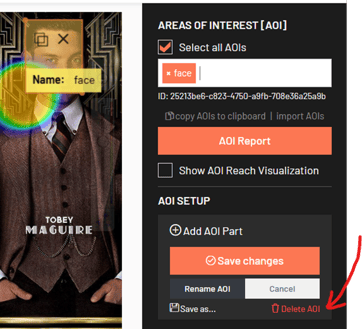
In the Analytics Dashboard, on the AOI panel on your right-hand side, you will see a list of all defined AOIs for the item. To delete an AOI:
1. From the list, select the AOI you want delete.
⚠️ Note: At this moment, it is only possible to delete AOIs one by one.
2. Once selected, click the Delete AOI (bin icon) to permanently remove it.
3. Confirm deletion. The AOI will be removed from the list and from any metrics calculated for this study. Deleting an AOI cannot be undone.
💌 If you have any questions or need further assistance, feel free to reach out to our team at support@realeye.io